top of page


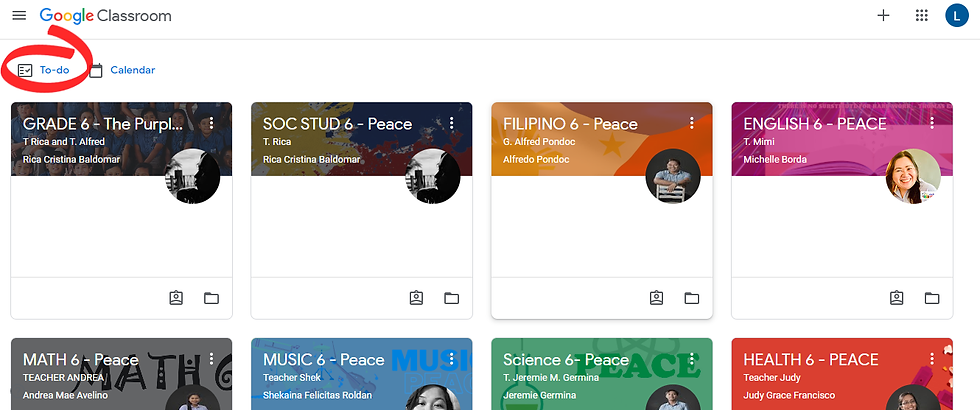
1. TO-DO AS IT APPEARS IN CLASSES - Go to Google Classroom. In the homepage, TO-DO can be seen just below the class title.


2. TO-DO ON THE LEFT HAND SIDE - In Google Classroom, click on the TO-DO icon found on the left-hand side. You will automatically see all of your child's assigned tasks.


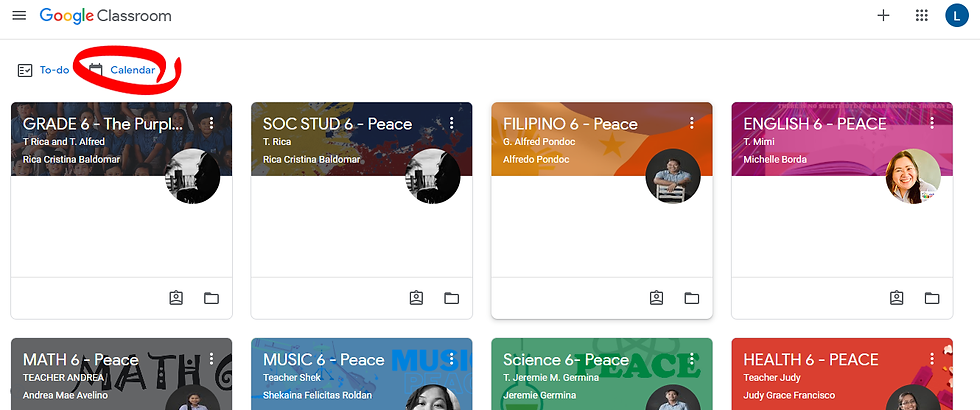
3. In Google Classroom, click on the Calendar icon found on the left-hand side. You will automatically see all of your child's assigned tasks for the whole week.


If you want to see tasks assigned for the upcoming weeks just click on the left arrow icon beside the date.


Hope these simple tips help. If you still need help feel free to contact us.


We are all thankful for our mobile devices. Reaching out to family and friends is so much more convenient. Communication and entertainment in the palm of your hands— and now, so can your child’s online learning. Until we can be sure that it is safe for our kids to attend school physically, any remote option is better than the risk of exposing them. So there’s no shame in using a mobile phone for your child’s online learning. The Covid-19 pandemic has disrupted so many jobs, livelihoods, and income sources that we need to be smart about how we spend our savings. A new laptop or desktop PC is not the only way to go. And Child’s Academy fully believes in this, that is why we are trying to find ways, so your child can maximize their education for much less. So if your child is using a mobile phone to attend their online classes, but you wish they had a bigger screen experience, there might be a few tricks that you can do.


Use your TV.


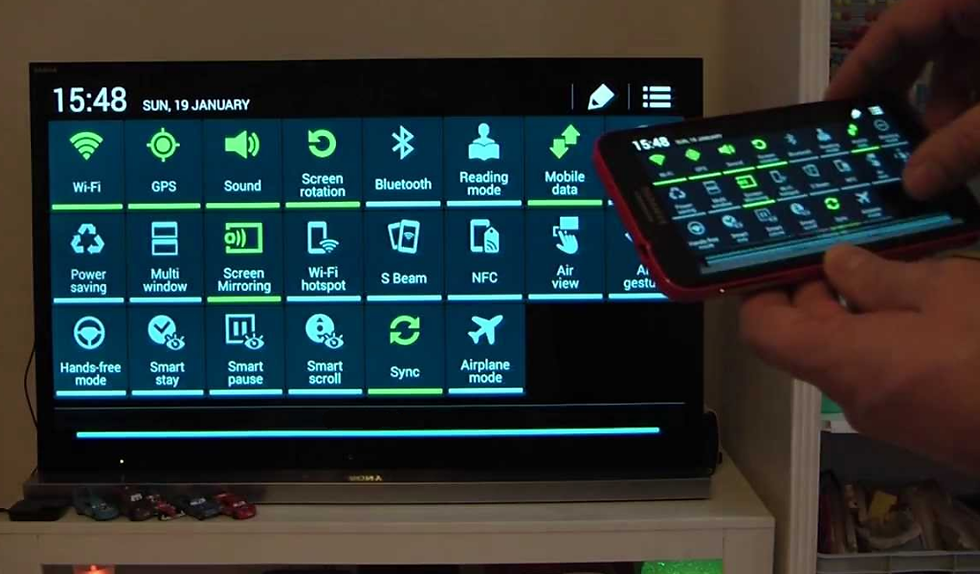
Yes, you heard that right. Use your TV by screen mirroring or casting.

What is screen mirroring and casting? Screen mirroring involves sending what's on your mobile gadget to a TV or projector via a cable or wireless connection. This can be a big advantage for students. A large screen offers a bigger, clearer view of presentations and speakers, and allows for easier collaboration if a number of students are attending remote classes at once. If you wish your child had a bigger display for schoolwork, a TV will certainly do the job. Almost every household has a mobile phone and a TV, which means that’s just a few steps more into pulling this off.


Two ways to connect an Android smartphone to a TV.


The first method you can use is a wireless connection. If you have a Smart TV, you may connect your devices through Wi-Fi or Bluetooth. The exact steps to do this will vary depending on what kind of Smart TV you own. Some Smart TV apps, like YouTube, for example, will allow you to “cast” media from the YouTube app on your Android to the YouTube app on your TV. Look for the “cast” icon on the app you’re using to view media on your Smart TV screen.


If you don’t have a Smart TV, you can still connect your Android to your TV wirelessly, using a receiver that plugs into your TV, like a Google Chromecast, Anycast, Miracast, or an Android TV box. Check out these items or similar ones on your online shopping app; you’ll find that these are a mere and measly fraction of the cost a brand new PC or laptop.


If you don’t have a Smart TV or wireless connection receiver, you can also connect your Android device to your TV with a mini USB to HDMI connection cord. These can be purchased on sites like Lazada or Shopee and are fairly inexpensive. Many people choose to opt for this wired connection as it is straightforward to set up simply by plugging the cord in and switching your TV to the HDMI input source you’ve connected to and tends to lag less than wireless connections sometimes can. Watch this video for more help— Click Here.


As long as your TV has an HDMI port, which all TVs made in the last decade or so will have, you will be able to use one of these two methods to connect your Android device to your TV. Whichever method you decide to go with, we hope this article has helped!


Story shared by Teacher Rica Cristina Baldomar.


When it was decided that we’d go online this school year, a huge pit opened up in my stomach. I was nervous and apprehensive - which are weird sensations considering that I’ve done online teaching and learning before. I examined my emotions and found that my anxiety was rooted in the fact that I hadn’t done this in years. I kept thinking about how different things are now, and how I didn’t want to be the teacher with the crummy online classes.

So, we started working on our online classes. We were introduced to Google Classrooms and explored the many messaging apps on the market. I was asked if I wanted to do summer online classes this year and I was like: “Why not?” I spent days getting my classroom ready for the summer class! During my first session, I was incredibly nervous. Thankfully, my flamboyant hosting instincts kicked in and my first lesson was conducted with the usual panache that I show in the physical classroom.


I examined my emotions and found that my anxiety was rooted on the fact that I hadn’t done this in years. I kept thinking about how different things are now, and how I didn’t want to be the teacher with the crummy online classes.

My apprehensions for the start of classes lessened, but they didn’t disappear. Just because I wasn’t as worried about my online classes as I was at the beginning didn’t mean that the pit in my stomach totally disappeared. For my fellow teachers who didn’t get the chance to try things out with summer classes, I would imagine the nervousness was worse. It didn’t matter that they’ve almost the same amount of online exposure to students as I’ve had (they had been conducting pilot classes and simulations non-stop), the urge to nitpick on their classrooms and go through everything once, twice, a gazillion times was overwhelming.


Three weeks before simulations the students’ CAI personnel email accounts were released to the parents. There were those who struggled with setting up their children’s online accounts, owing I guess to some being not too comfortable with the use of technology. I noticed this apprehension from the parents who had younger children who could not navigate the web. Younger children, of course, were not especially technology-savvy. There were some parents who were flummoxed by the unfamiliar set-up and who struggled to register their children to their accounts and to access all the necessary sites. I could not blame them. All this newness does take a lot of getting used to. It wasn’t such an issue with the parents who had older kids. The older children either had the know-how to set-up their accounts or had friends who could help them out.


Now, we weren’t about to just watch our parents flail about as they tried to prepare their kids for their online classes. Some of us, who couldn’t find the time outside work, asked the parents to bring over the gadgets that they’d be using so that we could help set them up. Other teachers who could find the time went to the children’s houses to personally help in setting-up the online learning tools. I was happy to see that each of us was contributing to make sure that school opening would be smooth and successful.


The weekend before the simulations I found myself hunched over my computer. It didn’t matter that my lessons and Google Classrooms were ready the Friday before the weekend, I was anxious. Through the years, I’ve learned that the best way to deal with presentation or report anxiety is to ensure that I’m over-prepared. So yes, the Sunday afternoon before the simulations found me at school, still puttering about my Google Classroom.


On the day of the simulations, things didn’t go as smoothly as planned (when does it ever?). There were students who had fluctuating internet connections and who did not know how to troubleshoot. Some children got confused with their schedules and entered the wrong virtual classrooms. Others used their phones and these devices didn’t have certain apps installed which caused their own kind of chaos. So again, yes, Day 1 was a full-on case of hiccups. It wasn’t an unbearable day, though. There were many highlights to it. It was wonderful to see how the kids had grown after not having interacted with most of them for five months. Their smiles and giggles as we joked around, the excitement and pure energy as we played games and discussed lessons were enough to keep us going. We couldn’t really hold it against the kids that all these hiccups were happening because they were trying their hardest despite the fact that we could only supervise from afar.

Even virtually, they found ways to show their empathy towards each other.

Born from these struggles, I was especially touched to notice that the children were helping each other out. Even virtually, they found ways to show their empathy towards each other. I was happy to note that this particular behavior I loved about them inside the physical classroom still remained very salient in the virtual world. Whenever one of the older students would encounter a problem or technical difficulty, they would post their concerns in their respective class group chats. The other kids in the chat group would try to help their classmate out by either researching solutions or coming up with the answers themselves. Only when they’ve exhausted all means will they come to the teachers for help. The children were exerting maximum effort, from their end, to make sure that the class simulations went well for themselves and for everyone! Don’t you just love the Gen Z sense of oneness and independence rolled into one? I felt fuzzy and warm. And these wonderful feelings washed over the weird sensations I felt at the beginning. Things would be okay.


The second day went smoother than the first. The kids (and their parents) had gotten the hang of using video teleconferencing apps and the Google Classrooms. There were fewer messages from the parents asking us to troubleshoot for them. The students weren’t as confused with their schedules and didn’t wander into the wrong virtual classrooms anymore. And they were still as enthusiastic as they were on Day 1. They were as active in their classes, and we couldn’t get enough of how our adorable munchkins (little and not so little) had done some growing up over the course of the ECQ to MGCQ. So yes, it was a happy second day of virtual classes!


The third day felt surreal. Some of us teachers had begun talking about what the kids would be doing the next day. We stopped in the middle of these conversations because we would then remember that these three days weren’t actual school days yet but rather simulations of how classes would run when they started on the 24th. Funny how we had all (parents, teachers, and students alike) fallen into a routine of sorts. At the end of the simulation classes, and as I bid the kids goodbye, I felt a little sad. I had been very happy to see the kids and felt a sense of loss that I wouldn’t see them again for another ten days.


These three days were three days of firsts for all of us. These were teaching and learning experiences for teachers, students, and parents. I’m sure that when classes start there will still be quite a few wrinkles that we’d need to iron out but it is going to be okay. These three days weren’t just about fixing things that needed fixing and finding problems that we might have not seen the first time around. These three days were also about boosting everyone’s confidence. These three days proved that C.H.I.L.D.’S Academy Inc., can do just about anything with the support and effort of its community of teachers, parents, and students.


Let the classes begin!


© 2020 by Child's Academy Inc. 

Visit us on Facebook 

  • Facebook
bottom of page